Promise
What is a Promise?
A promise is an object that may produce a single value some time in the future: either a resolved value, or a reason that it’s not resolved (e.g., a network error occurred). A promise may be in one of 3 possible states: fulfilled, rejected, or pending. Promise users can attach callbacks to handle the fulfilled value or the reason for rejection.
How Promises Work
A promise is an object which can be returned synchronously from an asynchronous function. It will be in one of 3 possible states:
- Fulfilled:
onFulfilled()will be called (e.g.,resolve()was called) - Rejected:
onRejected()will be called (e.g.,reject()was called) - Pending: not yet fulfilled or rejected
A promise is settled if it’s not pending (it has been resolved or rejected). Sometimes people use resolved and settled to mean the same thing: not pending.
Once settled, a promise can not be resettled. Calling resolve() or reject() again will have no effect. The immutability of a settled promise is an important feature.
Native JavaScript promises don’t expose promise states. Instead, you’re expected to treat the promise as a black box. Only the function responsible for creating the promise will have knowledge of the promise status, or access to resolve or reject.
Here is a function that returns a promise which will resolve after a specified time delay:
const wait = time => new Promise((resolve) => setTimeout(resolve, time));

wait(3000).then(() => console.log('Hello!')); // 'Hello!'
Our wait(3000) call will wait 3000ms (3 seconds), and then log 'Hello!'. All spec-compatible promises define a .then() method which you use to pass handlers which can take the resolved or rejected value.
The ES6 promise constructor takes a function. That function takes two parameters, resolve(), and reject(). In the example above, we’re only using resolve(), so I left reject() off the parameter list. Then we call setTimeout() to create the delay, and call resolve() when it’s finished.
You can optionally resolve() or reject() with values, which will be passed to the callback functions attached with .then().
When I reject() with a value, I always pass an Error object.
Generally I want two possible resolution states: the normal happy path, or an exception — anything that stops the normal happy path from happening. Passing an Error object makes that explicit.
Important Promise Rules
A standard for promises was defined by the Promises/A+ specification community. There are many implementations which conform to the standard, including the JavaScript standard ECMAScript promises. Promises following the spec must follow a specific set of rules:
- A promise or “thenable” is an object that supplies a standard-compliant
.then()method. - A pending promise may transition into a fulfilled or rejected state.
- A fulfilled or rejected promise is settled, and must not transition into any other state.
- Once a promise is settled, it must have a value (which may be
undefined). That value must not change.
Change in this context refers to identity (===) comparison. An object may be used as the fulfilled value, and object properties may mutate.
Every promise must supply a .then() method with the following signature:
promise.then(
  onFulfilled?: Function,
  onRejected?: Function
) => Promise
The .then() method must comply with these rules:
- Both
onFulfilled()andonRejected()are optional. - If the arguments supplied are not functions, they must be ignored.
onFulfilled()will be called after the promise is fulfilled, with the promise’s value as the first argument.onRejected()will be called after the promise is rejected, with the reason for rejection as the first argument. The reason may be any valid JavaScript value, but because rejections are essentially synonymous with exceptions, I recommend using Error objects.- Neither
onFulfilled()noronRejected()may be called more than once. .then()may be called many times on the same promise. In other words, a promise can be used to aggregate callbacks..then()must return a newpromise,promise2.- If
onFulfilled()oronRejected()return a valuex, andxis a promise,promise2will lock in with (assume the same state and value as)x. Otherwise,promise2will be fulfilled with the value ofx. - If either
onFulfilledoronRejectedthrows an exception e,promise2must be rejected with e as the reason. -IfonFulfilledis not a function andpromise1is fulfilled,promise2must be fulfilled with the same value aspromise1. - If
onRejectedis not a function andpromise1is rejected,promise2must be rejected with the same reason aspromise1.
Promise Chaining
Because .then() always returns a new promise, it’s possible to chain promises with precise control over how and where errors are handled. Promises allow you to mimic normal synchronous code’s try/catch behavior.
Like synchronous code, chaining will result in a sequence that runs in serial. In other words, you can do:
fetch(url)
  .then(process)
  .then(save)
  .catch(handleErrors)
;
Assuming each of the functions, fetch(), process(), and save() return promises, process() will wait for fetch() to complete before starting, and save() will wait for process() to complete before starting. handleErrors() will only run if any of the previous promises reject.
Here’s an example of a complex promise chain with multiple rejections:
const wait = time => new Promise(
  res => setTimeout(() => res(), time)
);

wait(200)
  // onFulfilled() can return a new promise, `x`
  .then(() => new Promise(res => res('foo')))
  // the next promise will assume the state of `x`
  .then(a => a)
  // Above we returned the unwrapped value of `x`
  // so `.then()` above returns a fulfilled promise
  // with that value:
  .then(b => console.log(b)) // 'foo'
  // Note that `null` is a valid promise value:
  .then(() => null)
  .then(c => console.log(c)) // null
  // The following error is not reported yet:
  .then(() => {throw new Error('foo');})
  // Instead, the returned promise is rejected
  // with the error as the reason:
  .then(
    // Nothing is logged here due to the error above:
    d => console.log(`d: ${ d }`),
    // Now we handle the error (rejection reason)
    e => console.log(e)) // [Error: foo]
  // With the previous exception handled, we can continue:
  .then(f => console.log(`f: ${ f }`)) // f: undefined
  // The following doesn't log. e was already handled,
  // so this handler doesn't get called:
  .catch(e => console.log(e))
  .then(() => { throw new Error('bar'); })
  // When a promise is rejected, success handlers get skipped.
  // Nothing logs here because of the 'bar' exception:
  .then(g => console.log(`g: ${ g }`))
  .catch(h => console.log(h)) // [Error: bar]
  ;
Error handling
Note that promises have both a success and an error handler, and it’s very common to see code that does this:
save().then(
  handleSuccess,
  handleError
);
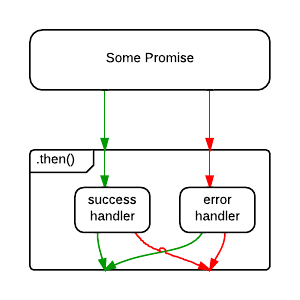
But what happens if handleSuccess() throws an error? The promise returned from .then() will be rejected, but there’s nothing there to catch the rejection — meaning that an error in your app gets swallowed. Oops!
For that reason, some people consider the code above to be an anti-pattern, and recommend the following, instead:
save()
  .then(handleSuccess)
  .catch(handleError)
;
The difference is subtle, but important. In the first example, an error originating in the save() operation will be caught, but an error originating in the handleSuccess() function will be swallowed.
In the second example, .catch() will handle rejections from either save(), or handleSuccess().
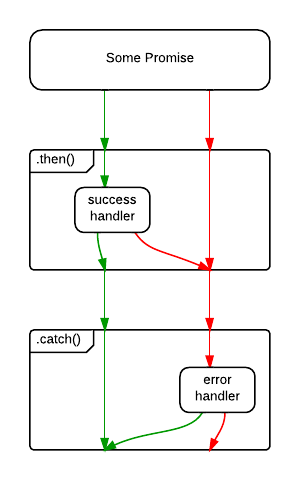
Of course, the save() error might be a networking error, whereas the handleSuccess() error may be because the developer forgot to handle a specific status code. What if you want to handle them differently? You could opt to handle them both:
save()
  .then(
    handleSuccess,
    handleNetworkError
  )
  .catch(handleProgrammerError)
;
I recommend ending all promise chains with a .catch().
Extras of the Native JS Promise
The native Promise object has some extra stuff you might be interested in:
Promise.reject()returns a rejected promise.Promise.resolve()returns a resolved promise.Promise.race()takes an array (or any iterable) and returns a promise that resolves with the value of the first resolved promise in the iterable, or rejects with the reason of the first promise that rejects.Promise.all()takes an array (or any iterable) and returns a promise that resolves when all of the promises in the iterable argument have resolved, or rejects with the reason of the first passed promise that rejects.
How Do I Cancel a Promise?
Read original source